Here is everything that has changed in DL-1 since our last product update, from the headline features to the small fixes, plus the upgrade notes worth reading before you install.
Eight states per preset
Each preset now holds eight states, A to H, up from four. Each state captures the whole rig, including blocks, settings, routing and NAM model choices. The new keys sit in two rows above the LCD, and the PRESET STATES page shows all eight. Every state can be recalled and captured over MIDI.
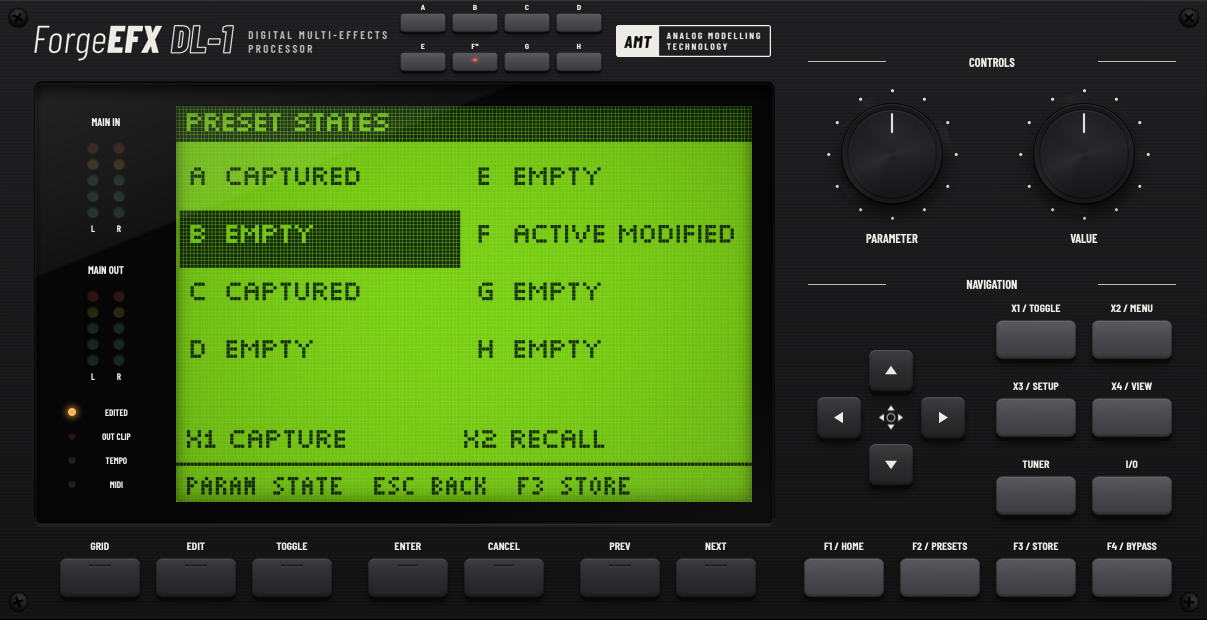
Cleaner state changes
Continuous controls now glide to their new values when you recall a state, so there are no zipper clicks. Blocks that stay the same keep running, so delay and reverb tails carry on through the change. When a state swaps an effect or a NAM capture, the two crossfade. Set the glide time, or turn it off, under Settings › State recall smoothing.
Your plugins, in the chain (DL-1 Paid)
The new VST block, in the Utility category, hosts a VST3 effect installed on your computer as one block in your grid. Open its window with Open Plugin or W. Add your own plugin folder under Settings › Folders. Only VST3 effect plugins are supported. Each VST block adds 1.33 ms of latency plus the plugin’s own, and this is not reported to your DAW. See the VST block.
AI tone editing
DL-1 can now run a local MCP server, so an AI assistant can build and adjust tones while you watch. Your controls lock during an edit, and Cancel AI Edits restores your starting sound. It is off by default: turn it on under Settings › MCP Server. An AI assistant is not included. How AI tone editing works.
On the Mac
DL-1 now installs as an Audio Unit as well as VST3 and standalone, for Logic Pro and other AU hosts. Every Mac binary is universal, running natively on Apple silicon and Intel, and needs macOS 11 Big Sur or later. Builds are signed and Apple-notarized, so they open without security warnings.
Smaller things that add up
- Drag .nam captures and .wav IRs onto the panel to add them to your library.
- Shift-double-click any control to type an exact value. For named choices, captures and IRs, type part of the name.
- Name presets directly on the LCD, with click-to-place cursor, selection, copy and paste.
- The strobe tuner now reads from 25 Hz to 2 kHz, down to a low A0, and tuner settings respond to clicks, scrolls and drags.
- LCD actions such as Enter, Cancel and Save are clickable, and MIDI learn works with the mouse.
- Knob drags in a DAW record as one clean automation move.
- The editor opens faster, because NAM and IR lists load in the background.
- Switching NAM models is more reliable.
- Fixed: a fresh Windows standalone install could start silent.
- DL-1 Free now includes IR Loader and Volume.
Before you update
- DAW projects from earlier versions don’t restore DL-1’s settings. Rebuild your DL-1 setup in those projects, or save it as a preset first. Preset files that name their effects still load if those blocks are installed.
- DL-1 no longer ships with factory presets. The preset browser shows only your own presets.
- Presets that use states E–H won’t open in earlier versions of DL-1. Presets using only A–D stay compatible.
- In the plugin, Space now belongs to your DAW, so it can start and stop the transport. The standalone app still uses Space to toggle.
- Install your Blocks folder before opening the standalone. If no block library is installed, a session from an earlier version starts clean.